
Epoch 2: It Serves. Does It Train?
Fine-tuning Gemma 4 with Unsloth on two AMD Radeon RX 7900 XTX cards, and how much of the pain was actually AMD's Slug
TL;DR
- Question: Can you fine-tune a language model on AMD consumer GPUs, and what does it take?
- What we did: We fine-tuned Gemma 4 with LoRA on two AMD Radeon RX 7900 XTX cards using Unsloth on ROCm: on one card and on two, in 16-bit and 4-bit, and with a smaller and a larger model.
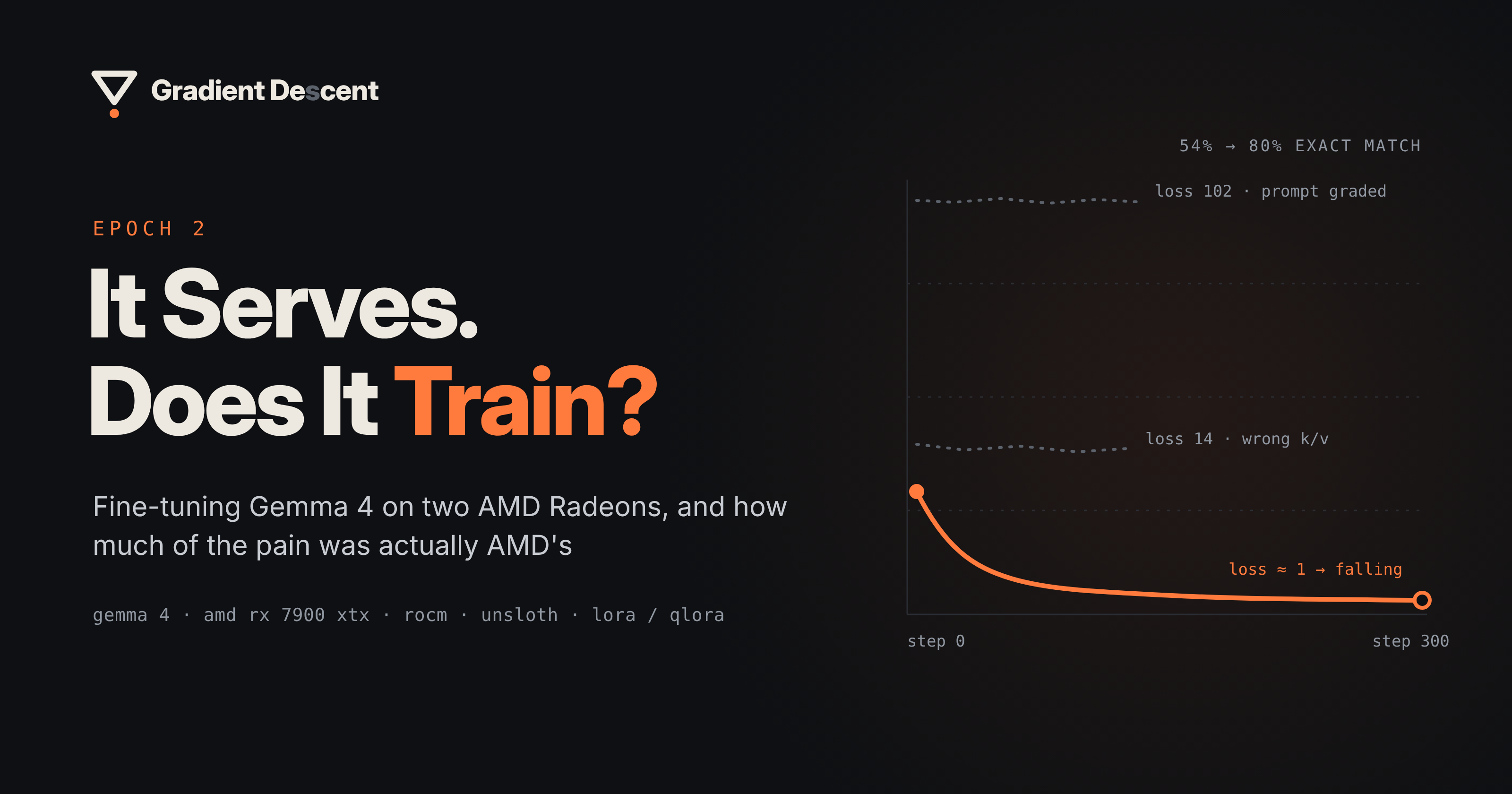
- Answer: Yes. Every setup trained, and on our test task the model's score went from 54% to about 80% in around five minutes.
- What to watch for: The install needed only two small AMD-specific fixes. The real trouble was four bugs that broke training without any error message, and none of them came from AMD. Checking the loss in the first 10 steps caught all four.
- Our recommendation: Start with Unsloth and 16-bit LoRA on one card. Add the second card when you want faster runs, and switch to 4-bit when the model doesn't fit.
The full experiments, with numbers and charts, are in the Appendix. New to some of the terms? See the Glossary.
In Epoch 0 I said this blog would learn the way models do: take a small step, check how wrong you were, adjust, repeat. In Epoch 1, we took that first step. We got Gemma 4 running on two AMD Radeon RX 7900 XTX cards with llama.cpp, serving our agents. That answered one question: can this box run the model?
The next question is harder: can it train the model?
On NVIDIA, fine-tuning is a well-worn path. Most kernels, libraries and tutorials are built for CUDA first: Flash Attention, xformers, bitsandbytes, even the nvidia-smi in every guide. On AMD, the path is much less clear.
For us, it isn't optional. Our project is air-gapped, so if we want to adapt a model to our own data, the training has to happen on the same machine.
Two things in 2026 made this worth trying. Unsloth released an official AMD install path, and bitsandbytes 0.50 added a ROCm backend, which is what 4-bit QLoRA needs.
So we took the Epoch 1 box and gave it something to learn.
Picking a task we can grade
Before training anything, we needed a way to tell whether training actually helped. That means a task with a clear score, where every answer can be checked against a reference.
We picked text-to-SQL. The model gets a table schema and a question in plain English, and writes one SQL query. Every question comes with a gold (reference) query, so we can compare the model's answer against it directly. The answers are also short, one line of SQL, so a full training run takes about five minutes instead of hours. That let us repeat every run several times.
Here's one example from the dataset:
Schema:   CREATE TABLE table_name_64 (pali VARCHAR, tibetan VARCHAR)
Question: What is the pali word for phrag dog in tibetan?
Answer:   SELECT pali FROM table_name_64 WHERE tibetan = "phrag dog"
The data is b-mc2/sql-create-context. We shuffled it once with seed 42, kept the last 300 rows aside as the test set, and trained on 5,000 of the rest. That split never changed.
We measured two things:
- Exact match: after normalising case, quotes and spacing, is the model's query the same as the gold query? This is our main score.
- Executes: does the query run in SQLite without an error? Every model, even the untrained one, scored ~98% here, so it couldn't tell runs apart.
Why not run both queries and compare the results? The dataset has table definitions but no rows, so there's nothing to return.
The model is Gemma 4 E4B, the small one: about 4B parameters active per token, 8B in total. Before any training, it scored 54.0% exact match. That's the number to beat.
The hardware is the same box from Epoch 1:
| GPUs | 2 × AMD Radeon RX 7900 XTX (gfx1100, 24 GB each) |
|---|---|
| Host | Ryzen 7 with an integrated GPU, 32 GB RAM (30 GB usable), Rocky Linux |
| Stack | PyTorch 2.11.0 + ROCm 7.2 wheels, Unsloth 2026.9, transformers 5.5, TRL 0.24, PEFT 0.21, bitsandbytes 0.50.2 |
Every run used the same training recipe:
| Setting | Value |
|---|---|
| LoRA | r = 16, alpha = 16, attention + MLP on the language layers, vision/audio untouched |
| Training | 300 steps, effective batch 8 (4 per card × 2 accumulation steps on one card), lr 2e-4 linear, 10 warm-up steps, max length 512 |
| Loss | on the SQL answer only, not the prompt |
| Eval | greedy decoding, 300 held-out rows |
Getting it running: the easy part
We expected the install to be the hard part. It wasn't.
PyTorch ships ROCm builds (wheels) that bring their own ROCm runtime. We installed them, imported torch, and both GPUs showed up. bf16 worked. PyTorch's built-in attention (SDPA) worked. That covers most of what training needs.
Only two things needed fixing, and both were AMD-specific.
Installing Unsloth broke ROCm's Triton. Unsloth depends on triton and xformers. When pip installs them, it pulls the CUDA builds from PyPI, and those overwrite the ROCm Triton that came with PyTorch. The fix is a small overrides file that tells the installer to skip both packages:
# overrides.txt
triton; sys_platform == "never"
xformers; sys_platform == "never"
uv pip install --override overrides.txt "unsloth[amd]"
The CPU's built-in graphics showed up as a third GPU. Our Ryzen CPU has a small integrated GPU (gfx1036), and ROCm lists it next to the two 7900 XTX cards. One environment variable hides it:
export HIP_VISIBLE_DEVICES=0,1
Two smaller issues came from the software stack, not from AMD:
- Unsloth swaps
google/…model names for its own mirror copies and downloads those instead. Settinguse_exact_model_name=Truekeeps the model you asked for. - On a fresh machine,
load_dataset()in offline mode fails until the dataset has been downloaded once.
We also went without two things. Flash Attention 2 and xformers weren't available in our setup on gfx1100, so Unsloth used SDPA instead. We had nothing to compare against, so we can't say what that cost us. Every number in this post was measured without them.
You'll see a few scary-looking warnings in the logs too. All of them are harmless, and we lost time on each before learning to ignore them:
Attempting to use CK on an unsupported architecture- failed loads of torchao's CUTLASS kernels
expandable_segments not supported on this platform
The plot twist: training ran, and learned nothing
Our first training run used the standard Hugging Face tools: TRL's SFTTrainer with a PEFT LoRA adapter. It started fine and logged its first loss: 102.
For this task, a healthy first loss is around 1. A loss of 102 means the model is being scored on the wrong thing. But nothing crashed, and nothing warned us. If we hadn't looked at that one number, the run would have finished, the eval would have shown no improvement, and we'd have concluded that "fine-tuning doesn't work on AMD".
Getting to a correct run took four fixes. None of these bugs raised an error:
- Loss 102: The loss included the prompt instead of only the SQL answer. We want the loss on the SQL answer only, so TRL measures the prompt's length and masks it out. But TRL 0.24 expects
apply_chat_template(tokenize=True)to return a list, and transformers 5.5 returns aBatchEncodingobject instead. TRL read every prompt as 2 tokens long, so almost the whole prompt counted toward the loss. - Loss stuck at 14: some layers read empty memory. In Gemma 4 E4B, layers 24–41 don't compute their own keys and values (K/V). They reuse the K/V from earlier layers, passed along through the KV cache. Training turns the cache off (
use_cache=False), so those 18 layers had nothing to read. - Gradients 8× too big. We accumulate gradients over 8 steps, so the loss should be divided by 8. Gemma 4's
forwardaccepts thenum_items_in_batchargument that should handle this scaling, but ignored it. - 36 LoRA modules that never learned. Those same 18 layers never run their key and value projections, so the LoRA adapters attached to them never got a gradient (36 modules, 72 weight matrices). On one GPU, this fails silently. On two GPUs, DDP refuses to start, which is how we noticed.
Here's the twist: none of these are AMD bugs. They come from two libraries disagreeing about a return type, and from how Gemma 4 is built. The same code would fail the same way on an NVIDIA card.
Unsloth's Gemma 4 patches already fix the first three. When we switched to Unsloth, we got the same accuracy as our hand-patched Hugging Face setup, and training ran 1.7× faster (321 s vs 548 s). For the fourth issue, we removed the unused K/V projections from the LoRA target list, reducing the target modules from 294 to 258.
We also made a rule and followed it for the rest of this post: run a 10-step smoke test before every long run. If the first loss is around 1 (we saw 0.9 to 1.4) and going down, start the real run. If it's around 14 or 100, stop and debug.
What we found
With training fixed, we ran four experiments. Each one changed a single thing, and each setup ran with three seeds, so every number below is an average of three runs.
| Experiment | Question | Result | Takeaway |
|---|---|---|---|
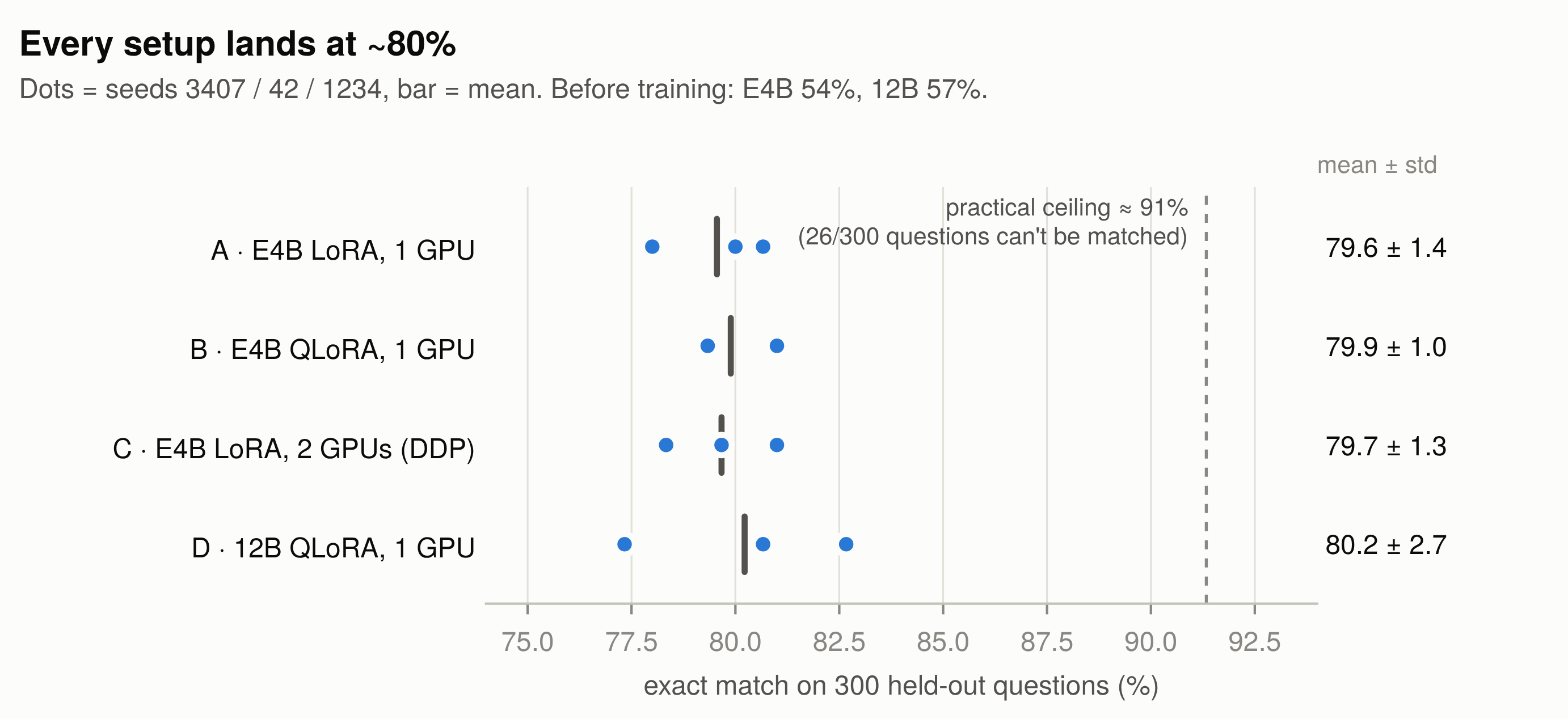
| A: 16-bit LoRA, one GPU | Does it learn, every time? | 54% → 79.6 ± 1.4 in about 5 minutes. Every seed gained 20+ points. | Yes, reliably. |
| B: 4-bit QLoRA, one GPU | Does 4-bit training work on AMD, and what does it save? | 79.9 ± 1.0, no NaNs. Saved 3.4 GB at peak, ran 1.4× slower. | Works, but saves little on this model. |
| C: 16-bit LoRA, two GPUs | What does a second card buy? | 79.7 ± 1.3, 1.63× faster, no tuning needed. | Same result, faster. |
| D: Gemma 4 12B, 4-bit, one GPU | Does a bigger model fit, and does it do better? | Fits in 9 GB. 80.2 ± 2.7, 2.3× slower to train. | Fits, but no better. |
So yes: training works on these cards, on one GPU or two, in bf16 or 4-bit.
One more thing stood out. Every setup landed at about 80%. When we read the answers, about 9% of the test questions turned out to have wrong or inconsistent gold answers, and most of what fine-tuning "fixed" was the dataset's writing style. So 80% is close to the ceiling of this test, not a limit of AMD or the model.
The full setups, tables and charts for each experiment are in the Appendix at the end.
The AMD scorecard
Here's everything we ran into, sorted by whose problem it really was:
- AMD: specific to ROCm or AMD hardware.
- Stack: Gemma 4, transformers, TRL, PEFT, Unsloth or datasets. These would happen on NVIDIA too.
- Host: our particular machine.
✅ Works as-is
| What | Evidence |
|---|---|
| PyTorch 2.11 + ROCm 7.2 wheels on gfx1100 | both cards, every run |
| bf16 LoRA with Unsloth | Exp A: 79.6 ± 1.4, ~5 min |
| QLoRA (NF4) via bitsandbytes 0.50.2 | Exp B, Exp D: 0 NaN |
| Two-GPU DDP over RCCL | Exp C: 1.63×, no tuning |
| 12B QLoRA on one 24 GB card | Exp D: 9.0 GB peak |
torch.compile, fused AdamW, SDPA attention |
all runs |
🔧 Works with a workaround
| What went wrong | Whose | Workaround | Silent? |
|---|---|---|---|
pip install unsloth pulls CUDA Triton/xformers |
AMD | --override overrides.txt |
no |
| The iGPU shows up as a third device | AMD | HIP_VISIBLE_DEVICES=0,1 |
no |
Unsloth swaps google/… ids for its mirrors and downloads |
Stack | use_exact_model_name=True |
no |
| Loss 102: prompt graded as answer | Stack | Unsloth, or tokenise yourself | yes |
| Loss 14: KV-shared layers read the wrong K/V | Stack | Unsloth, or force use_cache=True |
yes |
| Gradients 8× too large | Stack | Unsloth, or model_accepts_loss_kwargs = False |
yes |
| 36 LoRA modules never train | Stack | skip KV-shared k/v in the target list | yes |
| DDP processes hang before loading | Stack | file lock instead of dist.barrier() |
no |
KeyError: 'gemma4_unified' on the 12B |
Stack | newer transformers in a separate venv | no |
Offline load_dataset() fails on a fresh machine |
Stack | one online load first | no |
| Two processes loading overflow 30 GB of RAM | Host | load one rank at a time | no |
| Training "2× slower" | Host | it was a download; keep the box quiet | no |
❌ Not used: Flash Attention 2 and xformers weren't available in our stack on gfx1100. SDPA took their place in every run.
Not tested: FSDP or splitting one model across both cards, the 26B and 31B models, NVIDIA head-to-head.
| Count | |
|---|---|
| AMD-specific | 2, both install-time, both one line |
| Stack | 8, including all 4 silent ones |
| Host | 2 |
The verdict: on an RX 7900 XTX, the AMD-specific problems were packaging issues, and you fix them once. What actually cost us time, four silent training bugs and a model type our library didn't recognise, would have hit us on any GPU.
If you already own these cards, our recommended default is Unsloth with bf16 LoRA. Add DDP across both cards when you want faster runs, and switch to QLoRA when the model doesn't fit in bf16.
Seven more traps that give you wrong numbers without an error
Epoch 1 ended with seven traps that give you wrong numbers without any error. A crash costs you an hour; a wrong number that looks right costs you the decision. Training added seven more:
| # | Trap | What you see | Fix |
|---|---|---|---|
| 1 | Library version skew (TRL vs transformers) | Loss ~102, no error | Smoke test: first loss should be around 1 |
| 2 | Gemma 4 KV-shared layers with the cache off | Loss stuck near 14 | Use Unsloth's Gemma 4 path |
| 3 | num_items_in_batch ignored |
Loss and gradients 8× too large | model_accepts_loss_kwargs = False |
| 4 | Adapters on layers that never run | Fewer trainable weights than you think; DDP error on 2 GPUs | Check which modules actually get gradients |
| 5 | QLoRA adapter evaluated on the bf16 base | −2.8 points, every seed | Evaluate on the base you trained on |
| 6 | A download running during a timed run | "2× slower" new stack | Nothing else running while you time |
| 7 | Exact match against an imperfect gold | A ceiling at ~91% that looks like a model limit | Read the always-wrong questions |
Loss after Epoch 2
If Epoch 1 was the first real gradient step, this was the second. Here's what the loss told us, and where it points next:
- The AMD question had a software answer, again. Only two issues were AMD's, both fixed at install. The rest would have followed us to any GPU.
- Smoke-test the loss. Four bugs trained without an error. Ten steps and one number caught all of them.
- Three seeds, or it didn't happen. On 300 test questions, a 2-point gap between two single runs is noise. Every claim in this post is an average of three.
- Check what 4-bit can actually shrink. QLoRA compresses the model's main layers, but not its embedding tables. In E4B, 44% of the weights are embeddings, so 4-bit saved only 3.4 GB. In the 12B, embeddings are just 8%, so almost the whole model shrank and it trained in 9 GB.
- Bigger wasn't better here. The 12B fit on one card and matched E4B, at 2.3× the training time. Five setups landed on the same number.
- Read the misses, not just the score. About 9% of the test set can't be reliably matched, and two-thirds of the consistent fixes were style. A score can be stable and still measure the wrong thing.
Links
Gradient Decent
Tools and docs
- Unsloth: installing on AMD GPUs
- Unsloth: fine-tuning Gemma 4
- Unsloth: multi-GPU training
- bitsandbytes 0.50 installation (ROCm backend)
- PyTorch ROCm 7.2 wheels
- Google: fine-tuning Gemma with QLoRA in Hugging Face
Models and data
Taking small steps toward slightly less wrong. ∇
Appendix: the experiments in detail
The main post gives the short version. Here are the full setups, tables and charts for each experiment, plus our deep dive into the answers the models got wrong.
Five experiments, one chain of questions
We planned the experiments as a chain: each one answers a question and sets up the next. Before running each one, we wrote down what it had to prove.
| Objective | Decides | Changes only | |
|---|---|---|---|
| Exp A | Lift exact match by 20+ points with bf16 LoRA, on every seed | Does it learn on AMD, repeatably? | — (bf16 LoRA, one GPU) |
| Exp B | Train cleanly in 4-bit and measure the memory saved | Is QLoRA usable on ROCm, and worth it? | --load-in-4bit |
| Exp C | Measure the speed-up from the second card at equal accuracy | What do two cards buy us? | the launcher (torchrun, 2 processes) |
| Exp D | Fine-tune Gemma 4 12B on one 24 GB card | Does bigger fit, and is it better? | the model |
| The misses | Explain why every setup lands at ~80% | Is 80% the model or the test? | nothing: we read the predictions |
Each experiment changes one thing and keeps everything else fixed.
We ran each setup with three seeds: 3407, 42, and 1234. With 300 test questions, one answer changes the score by a third of a percentage point. A two-point difference between single runs could be random variation, so we report the mean and spread across seeds.
Why these training settings
We didn't tune any of these. The goal was to test the platform, not to get the best possible score, so we picked common starting values and kept them the same for every run. That way, any difference between experiments comes from the one thing we changed.
| Setting | Value | Why we picked it |
|---|---|---|
| LoRA rank and alpha | r = 16, alpha = 16 | Common starting values for LoRA: small enough to train fast, large enough to learn a narrow task like this one. |
| LoRA targets | attention + MLP layers of the language model | These layers do most of the work. The vision and audio parts aren't used for text-to-SQL, so we left them frozen. |
| Steps | 300 (about half an epoch: 2,400 of 5,000 examples) | Long enough for the loss to flatten (it does by about step 30), and short enough (about 5 minutes) to run every setup three times. |
| Effective batch | 8 | Fits comfortably in 24 GB, and splits evenly across two cards (4 + 4) in Exp C, so every experiment uses the same batch size. |
| Learning rate | 2e-4, linear decay, 10 warm-up steps | A standard learning rate for LoRA. The short warm-up avoids large, unstable updates in the first few steps. |
| Max length | 512 tokens | The schema, question and answer are short, so 512 tokens is plenty. |
| Loss | on the SQL answer only | We want the model to learn to write the answer, not to repeat the question. |
| Eval decoding | greedy | The model always picks its most likely next token, so the same model gives the same answers every time. That keeps runs comparable. |
Because these settings were chosen for the smaller E4B model and never tuned, the 12B results in Exp D show what the 12B does with the same recipe, not the best it could do.
Exp A — It learns, every time
Objective: Train the model with LoRA for 300 steps and check that its score goes up by at least 20 points. It has to happen on all three seeds, not just once.
Why 20 points? On a test set of 300 questions, a score can move by about ±5 points just by chance. A 20-point gain means 60 more correct answers, about four times what noise alone could produce. If every seed clears that bar, we know the training really worked and the gain isn’t luck.
Setup: Unsloth · bf16 · one RX 7900 XTX · 34.9M trainable parameters (0.43% of the model).
| Seed | Exact match | Train time | Peak VRAM |
|---|---|---|---|
| 3407 | 80.67% | 311 s | 18.2 GB |
| 42 | 80.00% | 316 s | 20.2 GB |
| 1234 | 78.00% | 324 s | 19.7 GB |
| Mean | 79.6 ± 1.4 | 317 s |
It worked. Exact match went from 54% to about 80%, in a little over five minutes per run. The best and worst seeds were 2.7 points apart, and all three cleared the +20 target.
Peak VRAM moved by up to 2 GB between seeds, even with identical settings. So for the rest of this post, we don't read anything into VRAM gaps smaller than that.
So what changed in the answers? Here's a question the base model got wrong:
What is the pali word for phrag dog in tibetan?
-- before: looks up the wrong column
SELECT tibetan FROM table_name_64 WHERE pali = 'phrag dog'
-- after
SELECT pali FROM table_name_64 WHERE tibetan = "phrag dog"
The base model swapped the two columns. After fine-tuning, it picks the right ones.
Here's a different kind of fix:
-- before
SELECT player FROM table_name_4 WHERE score = '71'
-- after
SELECT player FROM table_name_4 WHERE score = 71
Both queries run fine. In fact, the column is a VARCHAR (text), so the base model's quoted '71' is arguably the more correct one. Keep this example in mind; it comes back later.
Exp B — QLoRA works on AMD now, but saves less than you'd think
QLoRA stores the frozen base model in 4-bit (NF4) to save memory, and trains the small LoRA adapters in bf16 on top. It relies on bitsandbytes, which for a long time only ran on CUDA.
Objective: check that 4-bit QLoRA trains cleanly through bitsandbytes' ROCm backend, and measure what it saves.
Setup: same as Exp A plus --load-in-4bit · frozen base weights in NF4 · LoRA adapters train in bf16.
| Exp A: bf16 LoRA | Exp B: QLoRA | |
|---|---|---|
| Exact match (NF4 base) | 79.6 ± 1.4 | 79.9 ± 1.0 |
| Exact match (bf16 base) | — | 77.1 ± 1.1 |
| Train time | 317 s | 444 s (1.4×) |
| Peak VRAM | 19.4 GB | 16.0 GB |
- No NaNs. Unsloth's AMD guide warns that bitsandbytes 0.49.2 and older can produce NaNs in 4-bit. On 0.50.2 we saw none, in training or in generation.
- Same accuracy. On the 4-bit base it was trained with, QLoRA scored the same as bf16 LoRA.
- Use the adapter with the same base it was trained on. The QLoRA adapter was trained on top of the 4-bit model. When we attached it to the original bf16 model instead, every seed scored about 2.8 points lower. The adapter had learned to work with the 4-bit weights, so it fits that version of the model best.
The surprise was memory. We expected 4-bit to save about 5 GB at peak. It saved 3.4 GB, and training took 40% longer. To see why, look at what E4B is made of:
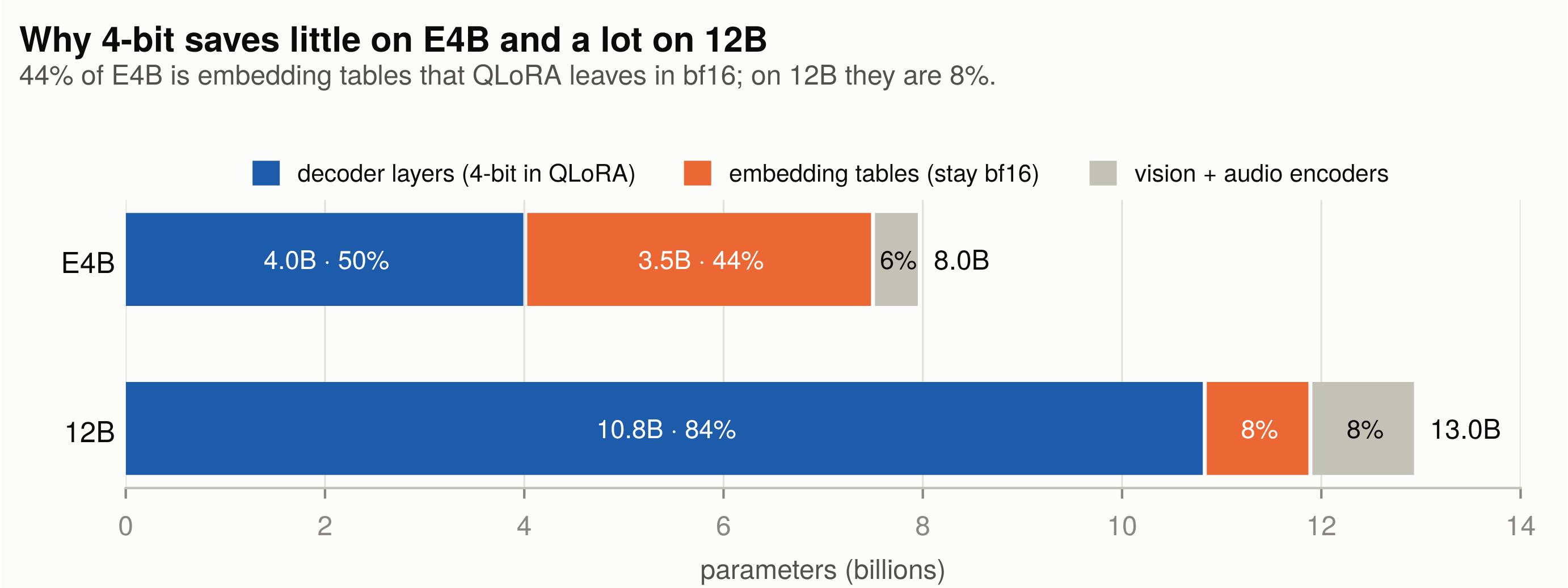
44% of E4B is embedding tables. 3.49B of its ~8B parameters are lookup tables: a 262k-token vocabulary plus Gemma's per-layer embeddings. QLoRA only shrinks the decoder's linear layers to 4-bit. The embeddings stay in bf16. So only the decoder's 4.03B parameters get smaller:
$$\text{most we can save} \approx 4.03\text{B} \times (2 - 0.5)\ \text{bytes} \approx 6\ \text{GB} \qquad \text{measured after loading: } 14.9 - 9.4 = 5.5\ \text{GB}$$
During training, activations and optimizer state take the same space in both setups. That's why the 5.5 GB saved after loading shrinks to 3.4 GB at peak.
In Epoch 1, the lesson was to count active parameters, not total ones. This is the same idea for memory: count what quantisation can actually touch. For E4B, that's only about half the model. Keep that 44% in mind for Exp D.
Exp C — Two cards, no tuning
Next question: does the second GPU help? We used DDP. Each card holds a full copy of the model, trains on its own half of the batch, and the two cards average their gradients after every step. On AMD, that averaging runs over RCCL, AMD's version of NVIDIA's NCCL.
Objective: measure what the second card buys, and check that the accuracy doesn't change.
Setup: the same bf16 LoRA · launched with torchrun --nproc_per_node 2 · batch 4 per card, no accumulation, so the effective batch is still 8 (Unsloth multi-GPU docs).
| One card (Exp A) | Two cards (Exp C) | |
|---|---|---|
| Exact match | 79.6 ± 1.4 | 79.7 ± 1.3 |
| Train time | 317 s | 195 s (1.63×) |
| Peak VRAM | 19.4 GB | 21.6 GB per card |
RCCL worked out of the box, with no environment variables and no tuning. Accuracy stayed the same, and a run took about three minutes instead of five: 1.63× faster. We expected about 1.7×. The small gap is most likely the time spent syncing gradients over PCIe.
Each card used about 2 GB more than the single-GPU run, at the same batch size of 4. DDP keeps its own gradient buffers, which is the likely reason.
The problems we did hit were on the CPU side, not the GPUs:
- RAM ran out while loading. Both processes load the model at the same time, and each holds about 13 GB in CPU RAM while doing it. Together they overflowed our 30 GB machine into swap, and loading slowed to about one second per tensor.
dist.barrier()made both processes hang. The usual way to load one process at a time was deadlocked, because Unsloth runs its own collective operations insidefrom_pretrained.- A plain file lock (
fcntl.flock) fixed it. One process loads, then the other.
Exp D — Going bigger: 12B on one card
Objective: find out whether Gemma 4 12B fine-tunes on a single 24 GB card, and whether it beats E4B.
Setup: QLoRA · one card · the exact E4B recipe: same learning rate, steps and batch. We didn't tune anything for the bigger model, on purpose.
The dependency trap, again
The first attempt to load the 12B failed with KeyError: 'gemma4_unified'. The 12B checkpoint uses a model type that transformers 5.5 doesn't know about.
Epoch 1 had the opposite problem: an unpinned transformers update broke vLLM. This time, our pinned version was too old.
We didn't want to touch the environment that all our E4B numbers came from. So we built a second one, venv-12b, identical except for a newer transformers (5.17), tokenizers and Unsloth. We diffed the two package lists to make sure nothing else had changed.
The side quest that became a rule
To check the new environment, we re-ran one E4B seed in it. Same accuracy, but it took 616 s instead of 311 s. Twice as slow.
We spent a good while on this. We turned off Unsloth's compilation (no change), compared the two stacks step by step, and tried a cold compile cache. The real cause was much simpler: the 12B model was downloading in the background the whole time, 23 GB over a slow connection.
With nothing else running, the new stack took 302 s against the old stack's 314 s. No slowdown at all.
New rule: no downloads and no other jobs during a timed run.
Results
| E4B QLoRA (Exp B) | 12B QLoRA (Exp D) | |
|---|---|---|
| Base model, untrained | 54.0% | 57.0% |
| After fine-tuning | 79.9 ± 1.0 | 80.2 ± 2.7 |
| Seeds | 81.0 / 79.3 / 79.3 | 82.7 / 77.3 / 80.7 |
| Trainable parameters | 34.9M | 65.6M |
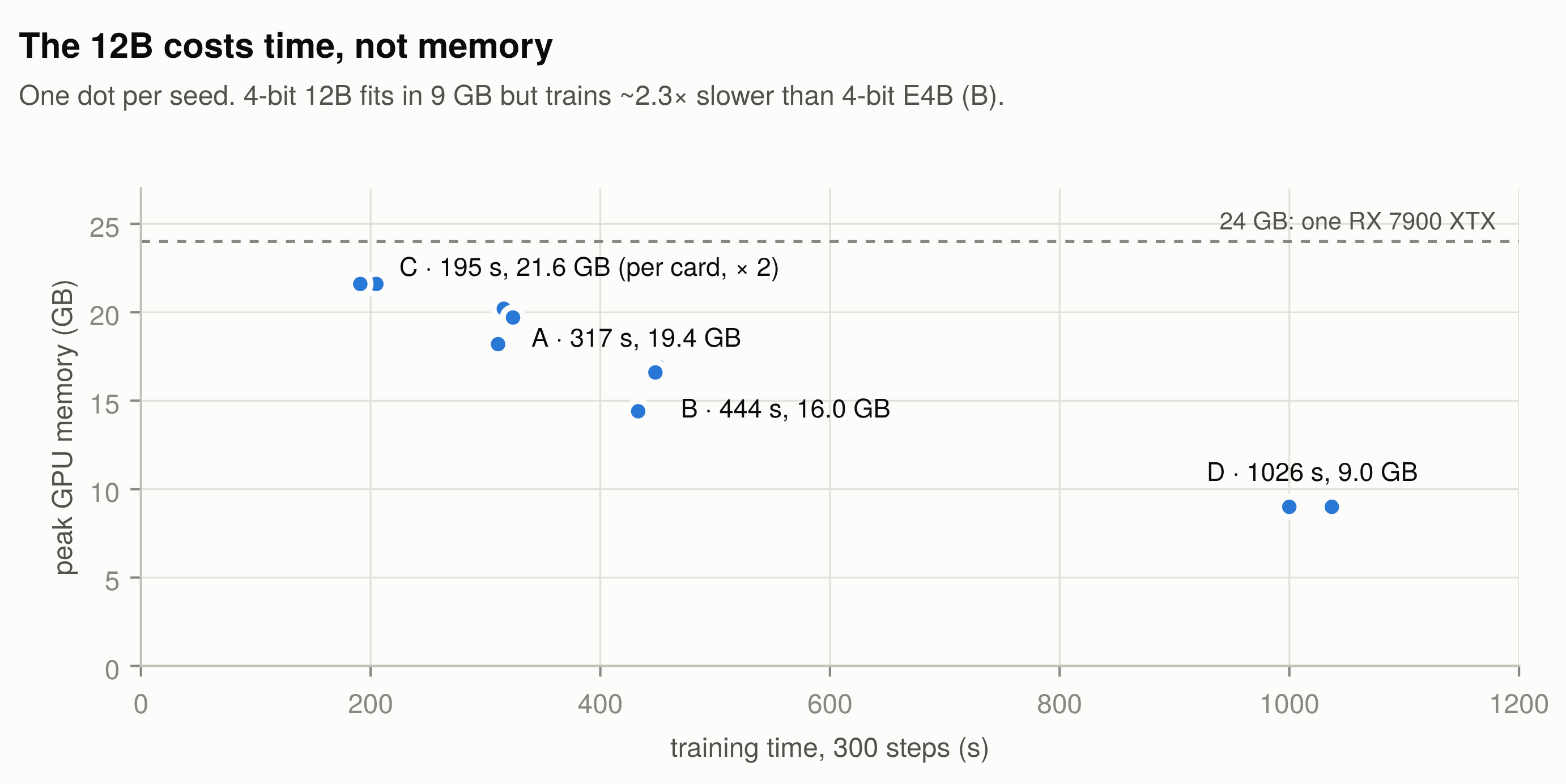
| Train time | 444 s | 1,026 s (2.3×) |
| Peak VRAM | 16.0 GB | 9.0 GB |
The 12B fits easily: 9 GB at peak on a 24 GB card. In bf16, its ~13B parameters alone would need about 26 GB, so 4-bit is what makes this run possible. QLoRA pays off here because only 8% of the 12B is embeddings (see the parameter chart in Exp B), so almost all of it gets quantised.
It even uses less memory than E4B in QLoRA. Part of that is the newer software stack: an E4B control run in it used 2 GB less. The other part is that the 12B has no per-layer embedding tables. E4B's 3.49B bf16 embedding parameters take about 7 GB, more than the 12B's whole 4-bit decoder (about 5.4 GB).
But the bigger model isn't more accurate. It starts 3 points higher (57% vs 54%), ends at the same place within noise, varies more across seeds, and takes 2.3× longer to train. The loss curves show why:
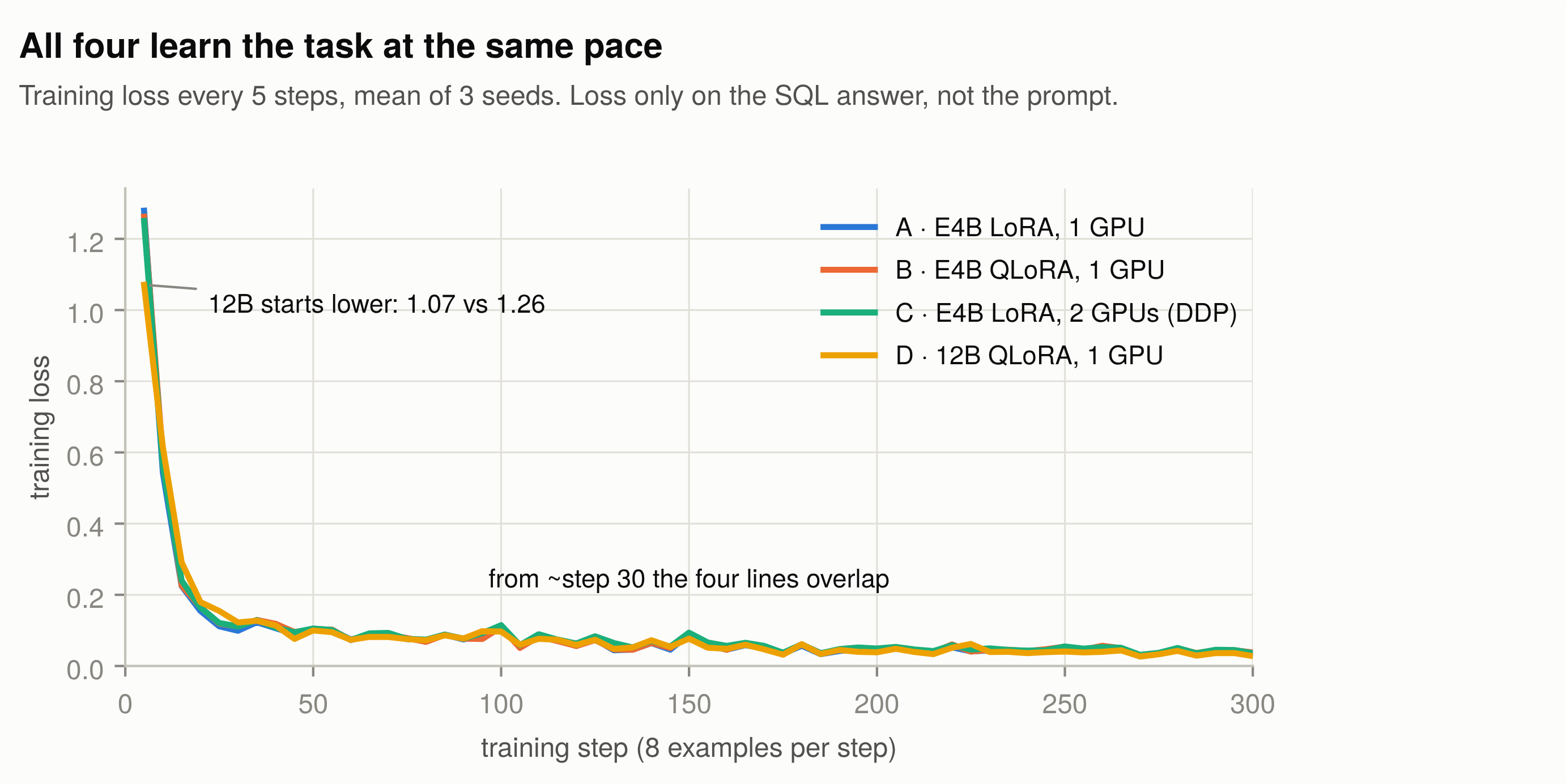
The 12B starts with a lower loss (1.07 vs 1.26), but by around step 30 all four curves sit on top of each other. Model size wasn't what kept the score at 80%. One caveat: we reused E4B's settings, so a tuned 12B might do better.
Still, five setups and two model sizes landing on the same number made us suspicious of the number itself.
Read the misses, not just the score
Every run saved its answer to each of the 300 test questions. So we lined up all 15 fine-tuned runs (A, B on both bases, C and D, three seeds each) and compared them question by question:
| Questions | |
|---|---|
| Right in every run | 200 |
| Wrong in every run | 32 |
| Mixed | 68 |
32 questions were wrong in every single run, whatever the setup, seed or model size. We read all 32 and sorted them by cause:
| Why it's "wrong" | Count | Example |
|---|---|---|
| The gold answer is wrong | 16 | Q: "What is the population in Westfield?" Gold: SELECT COUNT(population) …. All 15 runs return the population. |
| Quoting only | 7 | Gold season = 2007, model season = "2007". The column is VARCHAR; the dataset quotes numbers inconsistently. |
| Equivalent SQL | 3 | LEFT JOIN … IS NULL instead of the gold's EXCEPT. Same result. |
| Real model error | 6 | The model really is wrong. |
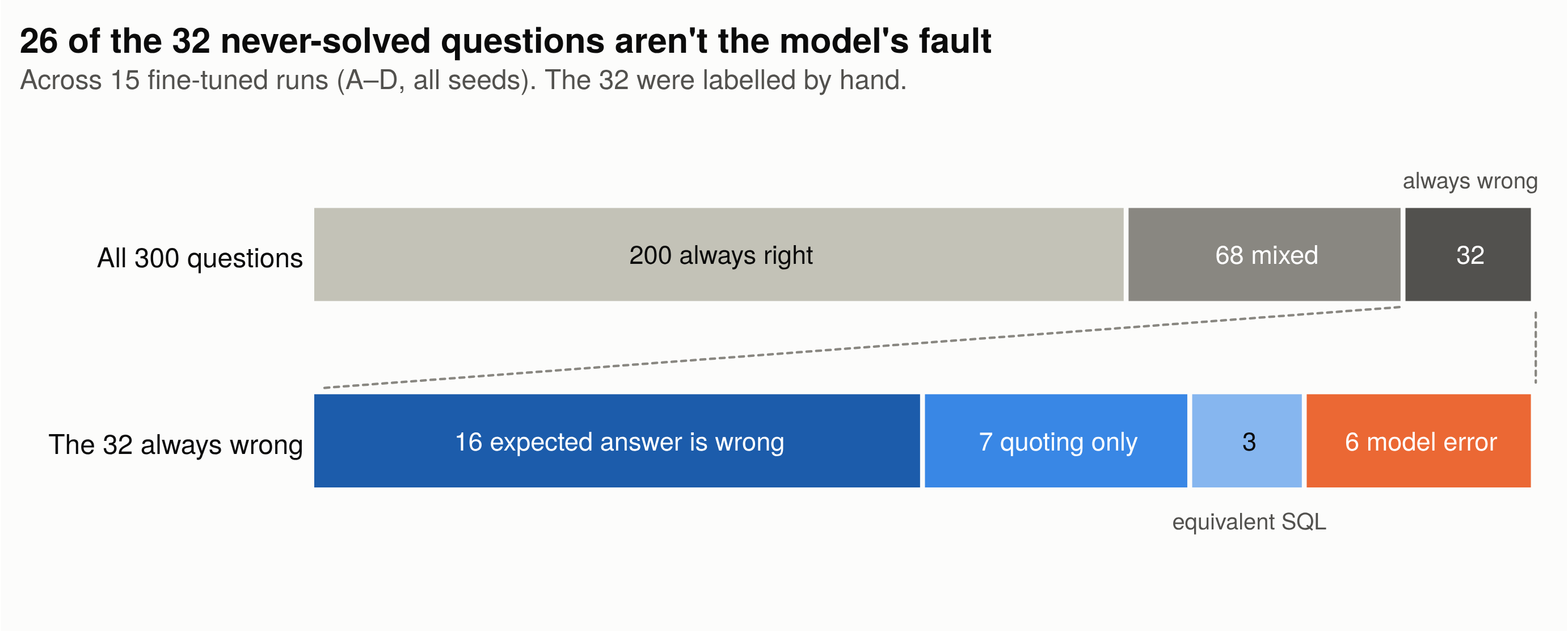
The 16 bad gold answers break down like this:
- four
COUNTs where the question asks for a value - four arbitrary
AVGs orSUMs - four that are broken or nonsense SQL
- two that need information that isn't in the schema or the question
- two with the wrong value or operator (
laps = 585for "more than 585 laps")
So what does that mean for the score?
- At least 16 gold answers are simply wrong, and another 10 can't be matched reliably. The quoting cases only match if the model happens to guess the dataset's inconsistent style, and the equivalent queries never match.
- That's 26 of 300 questions (8.7%). So the practical ceiling for exact match on this test set is about 91%, not 100%.
- It's an estimate. We only checked the always-wrong questions. Some bad gold answers are probably hiding among the 68 mixed ones too.
- At ~80%, every setup is really competing over those 68 mixed questions. That's where the seed-to-seed spread comes from.
Two of the six real errors also trace back to the dataset. Training taught the model that "how many" means COUNT so well that it adds COUNT even when the column already holds a count (countries_sampled, played). The same habit probably earns it points on some of the bad COUNT gold answers too.
Then we looked at the other side: what did fine-tuning fix? The base E4B model got 138 questions wrong. Fifty of those were fixed by all 15 runs, including the three 12B runs, even though they started from a different base model:
| What changed | Count |
|---|---|
Number quoting ('71' → 71) |
18 |
COUNT(*) → COUNT(column) |
7 |
ORDER BY … LIMIT 1 → MAX(…) |
6 |
Order of AND conditions |
2 |
| Content: right column, value or condition | 17 |
Remember the '71' from Exp A? Of those 50 fixes, about two-thirds were the dataset's house style, not better understanding. The base model's SQL was often fine; it just wasn't written the way this dataset writes SQL. Fine-tuning taught it those habits, and exact match rewards habits.
One more sign of this: the base model wrote 116 of its 300 answers across several lines, the way a person would. After fine-tuning, all 4,500 answers (15 runs × 300) are on one line, like the dataset.
This doesn't make the fine-tuning fake. But it changes what "54% → 80%" means. Part of it is the model understanding the questions better, and a big part is the model learning to match one particular grader. In Epoch 1, reading the outputs showed our benchmark was measuring speed, not answer quality. Here, reading the misses showed our score was partly measuring the dataset.
Putting the experiments together
Looked at side by side, the four experiments tell one story:
- The training itself is solid on AMD. Every setup learned, every seed landed within a few points of the others, and the GPU gave the same scores when we re-ran the evaluations.
- The choices change cost, not accuracy. bf16 or 4-bit, one card or two, 4B or 12B: all of them ended at about 80%. What changed was time and memory. Two cards made runs 1.63× faster, 4-bit made the 12B fit in 9 GB, and the bigger model took 2.3× longer for no gain.
- The ceiling came from the test, not the hardware. About 9% of the test set can't be reliably matched, and much of what training "fixed" was the dataset's style. To see real differences between setups, the next step is a cleaner test set and an evaluation that checks meaning, not exact wording.
So the details back up the main answer of this post: yes, you can fine-tune on AMD. The numbers you get are only as trustworthy as the test you measure them with.
Glossary
| Term | What it means |
|---|---|
| 4B, 12B | Model size in billions of parameters. Gemma 4 E4B has about 4B parameters active per token (8B in total); the 12B has about 12B. |
| bf16 | bfloat16, a 16-bit number format for model weights. Training in bf16 is the normal, full-quality way to fine-tune. |
| CUDA | NVIDIA's software platform for running code on its GPUs. Most ML tools are built for it first. |
| DDP | Distributed Data Parallel. Each GPU holds a full copy of the model, trains on part of the batch, and the GPUs average their gradients every step. |
| Effective batch | How many examples the model learns from per training step, across all GPUs and accumulation steps. |
| Epoch | One full pass over the training data. |
| Exact match | Our main score: the model's SQL counts as right only if it is identical to the gold answer after normalising case, quotes and spaces. |
| FSDP | Fully Sharded Data Parallel. Splits one model across several GPUs, for models too big for one card. Not tested here. |
| Gold answer | The reference answer in the dataset that the model's output is compared against. |
| GPU | Graphics processing unit. The chip that does the heavy maths in training. |
| iGPU | Integrated GPU: the small graphics chip built into a CPU. |
| K/V, KV cache | Keys and values: the stored attention data a model reuses so it doesn't recompute earlier tokens. |
| LoRA | Low-Rank Adaptation. Trains a small set of extra weights (adapters) on top of a frozen model, instead of the whole model. |
| Loss | The number training tries to make smaller. It measures how far the model's predictions are from the right answer. |
| MLP | Multi-layer perceptron: the feed-forward layers inside each transformer block. |
| NaN | "Not a Number": a broken value that shows up when the maths overflows. One NaN can ruin a training run. |
| NCCL / RCCL | The libraries GPUs use to share data with each other: NCCL on NVIDIA, RCCL on AMD. |
| NF4 | 4-bit NormalFloat: the 4-bit format QLoRA uses to store the frozen model. |
| PCIe | The connection between the GPUs and the motherboard. Data passed between our two cards goes over it. |
| PEFT | Parameter-Efficient Fine-Tuning: Hugging Face's library for LoRA and similar methods. |
| PyPI | The Python Package Index: where pip downloads packages from. |
| QLoRA | Quantized LoRA. Stores the frozen model in 4-bit to save memory, and trains LoRA adapters on top. |
| ROCm | AMD's software platform for running code on its GPUs: AMD's answer to CUDA. |
| SDPA | Scaled Dot-Product Attention: PyTorch's built-in attention, used when faster attention kernels aren't available. |
| Seed | A number that fixes the randomness in a run. Different seeds give slightly different results, which is why we ran three. |
| Smoke test | A very short run (here, 10 steps) to check that training behaves sensibly before starting the real one. |
| SQL | Structured Query Language: the language used to query databases. |
| TRL | Hugging Face's library for training language models, including the SFTTrainer we started with. |
| Unsloth | An open-source library that makes LoRA fine-tuning faster and lighter, with an official AMD install path. |
| venv | A Python virtual environment: a separate, self-contained set of installed packages. |
| VRAM | The memory on a GPU. Our cards have 24 GB each. |
About the author
- Hi, I’m Gayatri, co-founder of Nuvolink and a builder at heart. I’m part of a small founding team building AI products, working on agentic systems, ML and inference for real-world applications in legal tech and defence. Gradient Decent is where I learn in public: hands-on experiments with real numbers, literature surveys and deep dives, and short notes on what I’ve built or read. Topics include agentic systems, evals, search and retrieval, LLMs, and ML/DL. Every post is a small step forward, like a gradient update: not always optimal, but always slightly less wrong.
Comments
Join the discussionNo comments yet. Be the first to comment.